


Esvon Classifieds - Credits


 |
* Price includes single-domain lifetime license and 1 year of free access to new software versions.
|


 Module: Credits
Credits module allows website members to purchase credits packs with a single
credit card (wire transfer, paypal, money order, etc) payment.
After this credits can be used to make multiple website payments for listing placement or membership plans
at your website based on Esvon Classifieds script - PHP classified ads software.
With Credits module you have a system where website members could pre-purchase ad placement / membership credits. This allows the customer to pre-purchase ad space at a savings and then use their credit as they place ads. Only one credit card charge can take place for multiple ads (or future ads) without getting charged a service fee from the credit card company for each individual transaction.
USER BUYING CREDITS
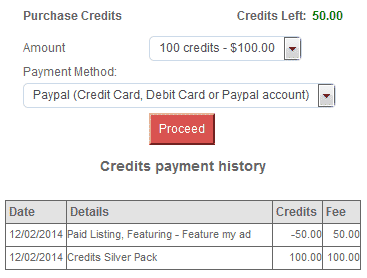
Once users log into their account area they can select an option to purchase credits. This gives them a drop down menu, in which they can select how many credits they desire and what dollar value relates to the credit amount.
Example :
Once they select a pricing plan they have the option to pay for these credits by credit card, Paypal, cheque, cash etc.
Once the credits have been approved either automatically or by the administrator it displays the amount of credits they have in there account details so they can see how many they have, whenever they are log in.
USER USING CREDITS
Once a user has credits they can use them to place ads.
Just as they were able to place an ad using $$$ they now also have the option to use credits they just purchased buy clicking on a selection function/tab choosing either $$$ or credits to place an ad. They also have the option in the "payment" area to select a default to use Credits or $$$. Next to this option they can click on a link to purchase more credits if they need.
They then just simply place the ad using credits.
If they chose to use credits to place an ad their account will automatically subtract the amount they used to place the ad and displays the amount of credits they have left in their account details.
If they chose to use $$$ to place an ad it will function as normal.
ADMINISTRATOR AREA
Administrator has option to set a $ value to a credit value. This value will calculate or convert the set ad amounts from $$ to credits when the user selects there payment option to use credits.
Example: In the Administrator under price plans you set the ad amounts to
Therefore when the user selects the payment option to use credits the following credit amounts are used:
In a price plan you can set the payment option for credits by entering the amount of credits and the cost to purchase those credits.
Example
This gives you the option to discount credits depending on the amount users buy. This also is the displayed amount users can buy when purchasing credit.
Demo:
 Download Demo Now
Free download
Pricing:
 Click to
buy!
Click to
buy!$155.95
Screenshots:
Other modules:
Affiliates moduleAttention Getters module
Auction module
Auto Notify module
Availability module
Banner Ads module
Chat module
Compare Items module
Coupons module
CSV Import module
Editors module
Instant Messenger module
Maps module
Member Website module
Multi Language module
Multi Category module
OAuth / Facebook Login module
Private Messaging module
Pay Per Click module
Rate Member module
Refine Search module
Regions module
Saved Searches module
Shopping Cart module
Signs and Flyers module
Stock Photo Gallery module
ZIP Code Radius Search module