



Esvon Classifieds - Refine Search


 |
* Price includes single-domain lifetime license and 1 year of free access to new software versions.
|


 Module: Refine Search
Refine Search module allows to add ability to filter (refine, browse)
search results by different listing fields (like price, year, make, model, mileage, etc) at your website based on
Esvon Classifieds script - PHP classified ads software.
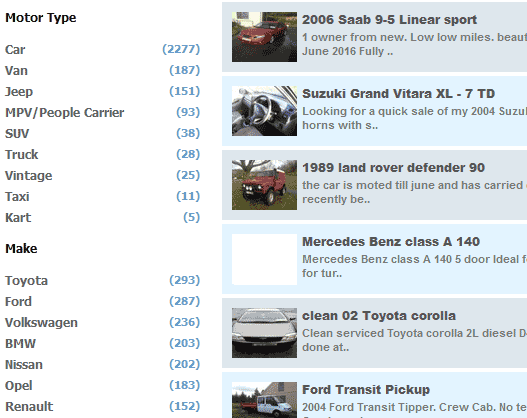
When website visitor performs advanced or quick search, "Filter By" block appears next to the matching listings displayed. This block provides ability to narrow down search results by different field values. These fields can include menu fields (like car's make/model) and numeric fields that can be searched by range of values (year, price, bedrooms amount, etc).
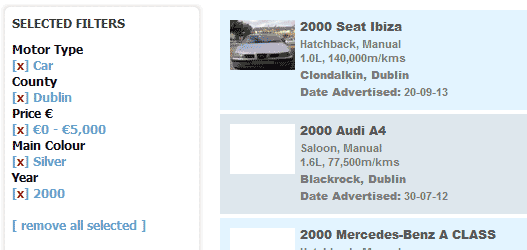
To apply certain filter, user just clicks on the preferred field value (or range). The field is removed from "Filter By" section and added to the "Selected Filters" section after this. Filters can be removed in the similar way one by one or all at once.
Admin Area allows to control listing fields available for refine search block, to specify amount of intervals between min and max values of numeric field (range filters) and to restrict "Refine Search" block to final level categories.
Demo:
 Download Demo Now
Free download
Pricing:
 Click to
buy!
Click to
buy!$155.95
Screenshots:
Other modules:
Affiliates moduleAttention Getters module
Auction module
Auto Notify module
Availability module
Banner Ads module
Chat module
Compare Items module
Coupons module
Credits module
CSV Import module
Editors module
Instant Messenger module
Maps module
Member Website module
Multi Language module
Multi Category module
OAuth / Facebook Login module
Private Messaging module
Pay Per Click module
Rate Member module
Regions module
Saved Searches module
Shopping Cart module
Signs and Flyers module
Stock Photo Gallery module
ZIP Code Radius Search module